Meeting Extraction — Billing Configurator Discussion
Meeting Details
| Field | Value |
|---|---|
| Date | 2026-02-19 |
| Duration | ~51 minutes |
| Participants | Jerry, Ash Alexander, Sarah Shalfoun |
| Facilitator | Jerry |
| Recording | video.mp4 |
| Transcript | transcript.txt |
Context
This session was a deep-dive into the billing configurator — what it was designed to do, what actually works, and how it relates to the billing instruction records in NetSuite. Jerry (original architect) walked through every tab of the configurator suitelet, explaining the design intent and current state. The discussion was triggered by the need to understand the configurator's technical foundation before deciding whether to rebuild it.
Key Topics Discussed
Topic 1: Billing Instructions Architecture (Ash & Jerry)
Summary: Ash explained the current Pymble architecture — billing instructions modeled after the BPOS subscription plan pattern. Jerry confirmed understanding.
Key Points: - The current Pymble setup uses Billing Profile (equivalent to BPOS Subscription Plan) and Billing Instruction (equivalent to Subscription Item) - Each billing profile is per family (debtor) - Billing instructions sit against each family and drive invoice generation - For Pymble, Ash manually built the billing instructions in Excel and imported them — he was "the configurator" - The configurator suitelet was designed to automate what Ash does manually
Jerry's comment: "So that's the customer, that's the line item. So you're storing this per family... and based on this the invoice gets generated."
Topic 2: Configurator Suitelet — Tab-by-Tab Walkthrough (Jerry)
Summary: Jerry walked through all 9 tabs of the billing configurator suitelet, explaining the purpose and design intent of each. He was clear that most of the tabs do not work — the UI exists but the back-end logic is incomplete.
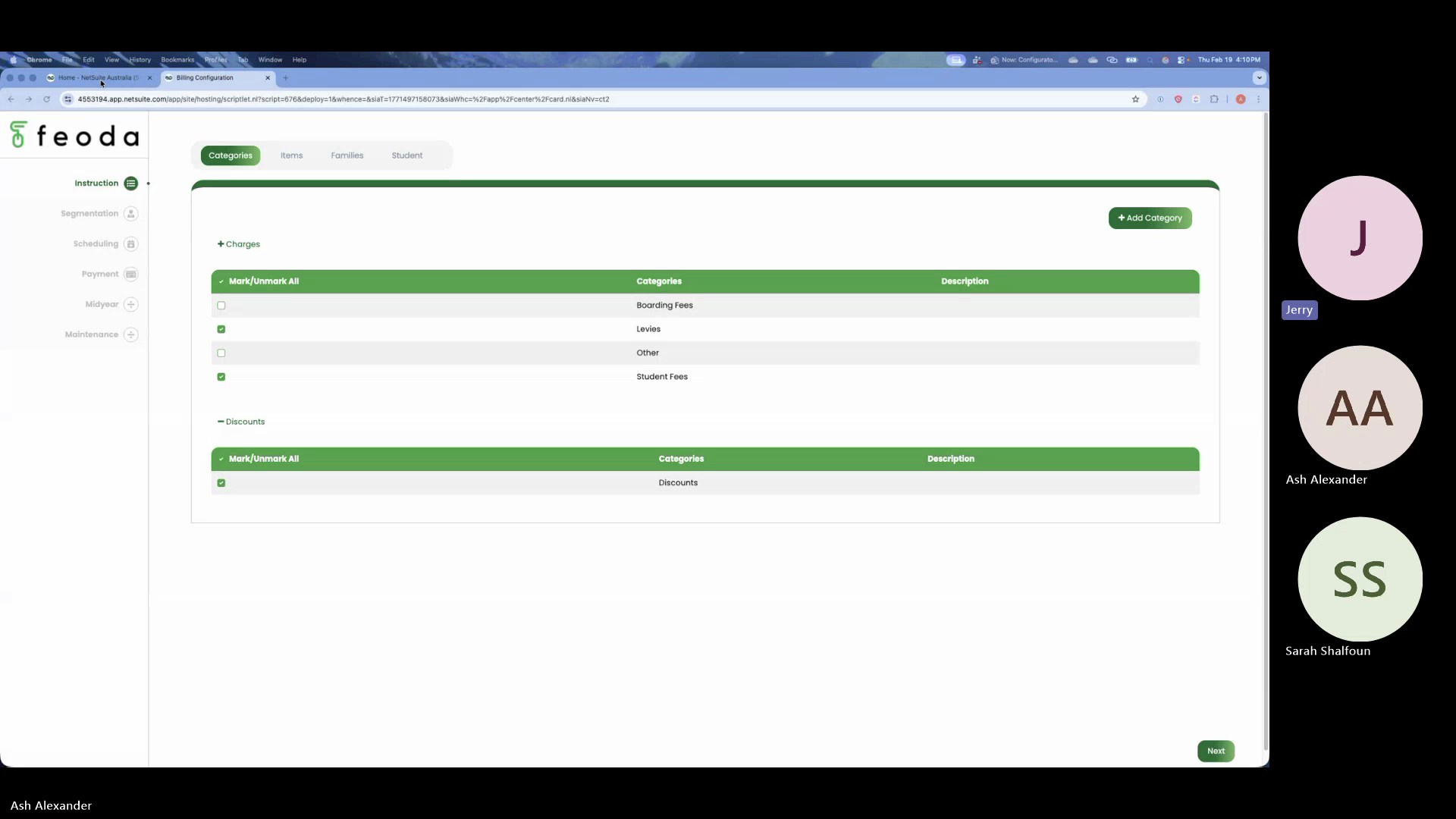
Tab 1: Segmentation
- Splits items into charges (sales) and discounts
- Asks the school: which charge categories and discount categories apply to your billing?
- Data sourced from a custom classification field on item records in NetSuite (called "billing engine type" or "class field")
- Some schools may have multiple discount categories (sibling, staff, parent), others may have just one
- If a school doesn't use categories, this tab is irrelevant — can be skipped
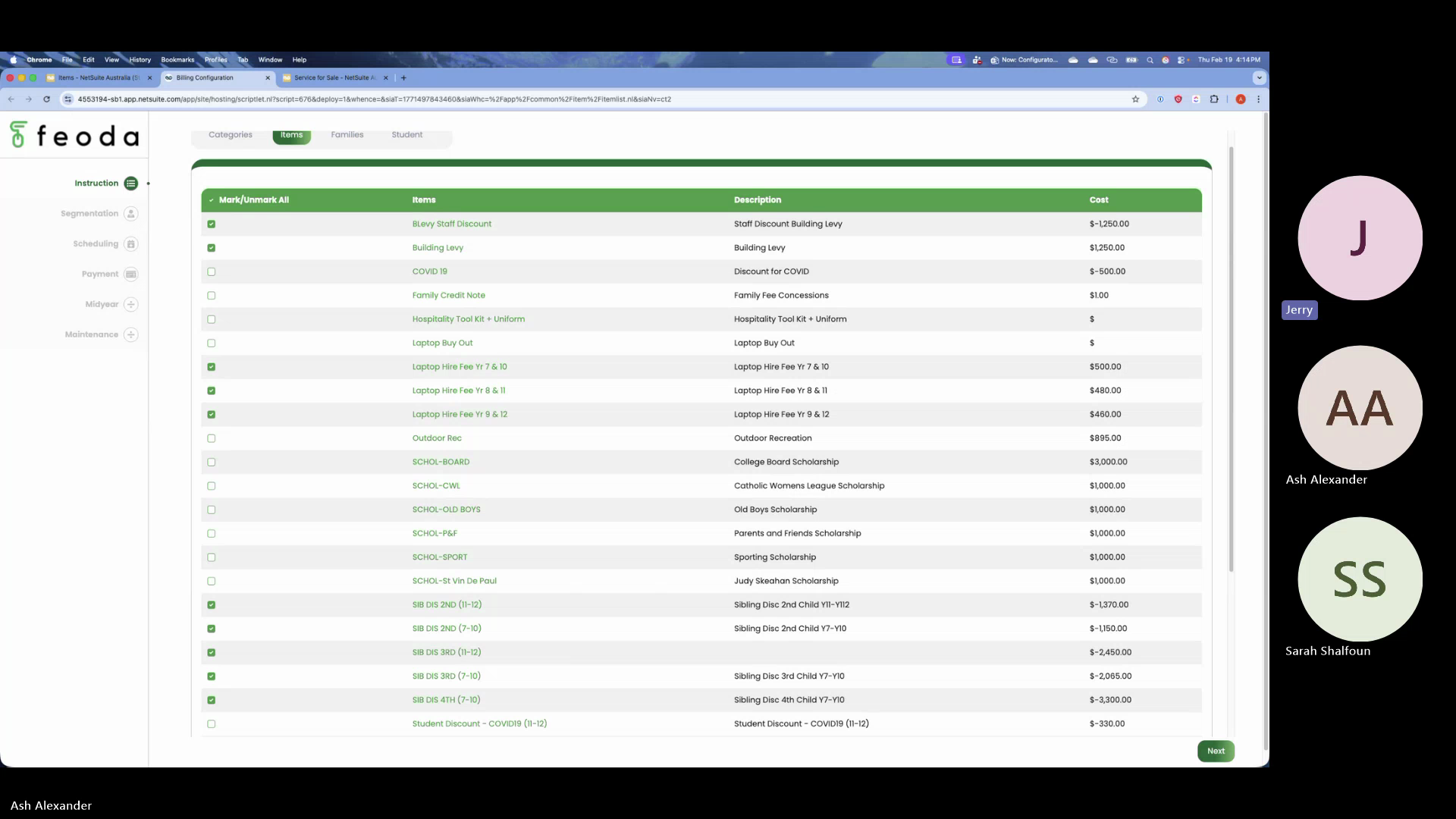
Tab 2: Items
- Direct replication of the NetSuite item list
- Allows the user to select which items should be included in the current billing cycle
- Purpose: not all items in NetSuite are used every cycle (e.g., COVID-19 discount was a one-time item)
- Selected items are passed to the billing engine; unselected items are ignored
- Jerry: "It's really giving a better interface for NetSuite's item list — that's all this screen does"
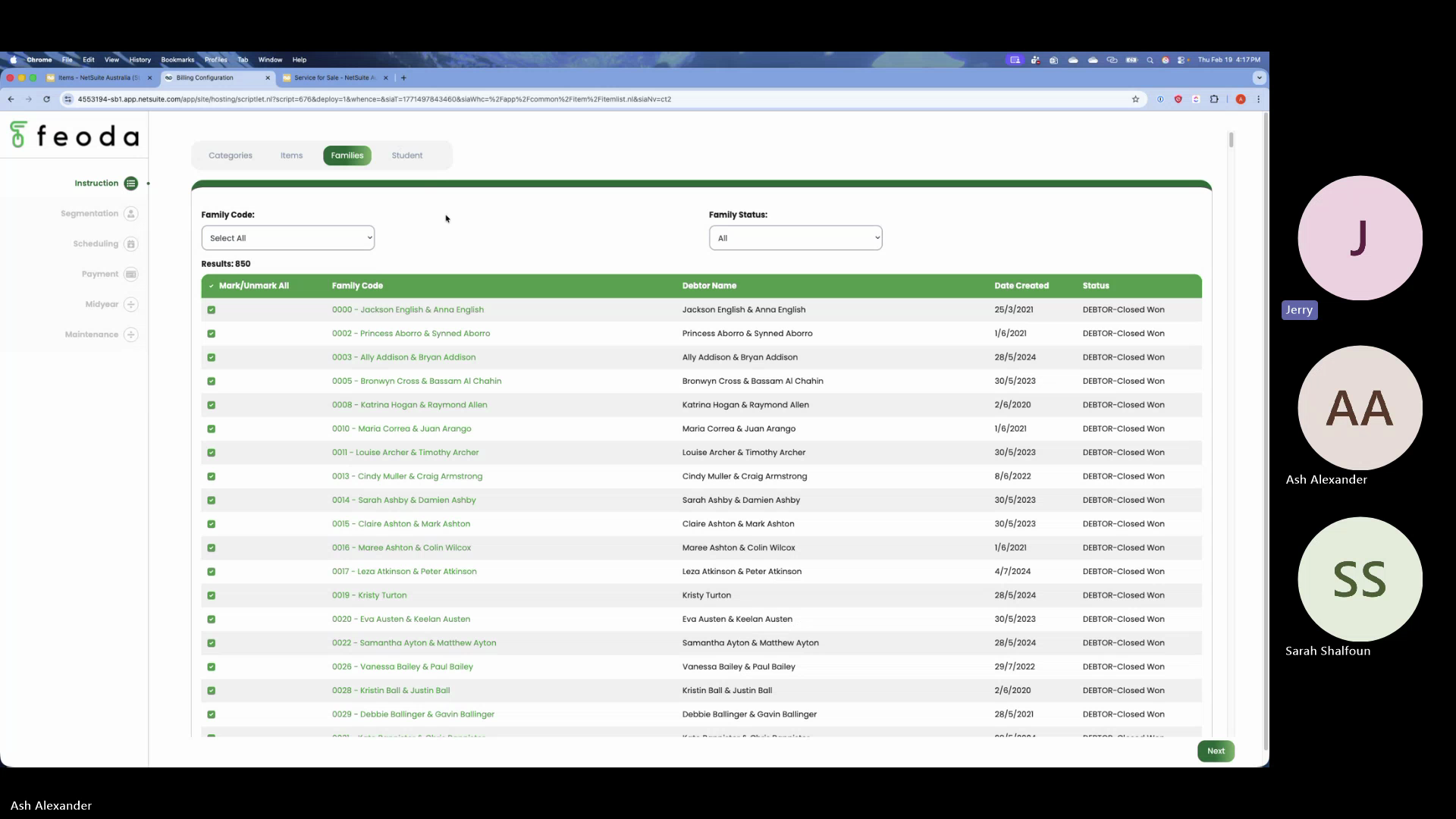
Tab 3: Families/Debtors
- Pulls the full list of families (debtors) from NetSuite
- Filters: family code, family status
- 99% of debtors should be pre-selected — this tab handles the exceptions
- Schools can exclude specific families from the billing engine (e.g., families needing manual invoicing, special conditions)
- Also serves as a visual reconciliation checkpoint — "we have 920 students, does this match?"
- Ash added: the SIS integration runs daily, so movements (students joining/leaving) are reflected; this tab helps iron out the 2-5% edge cases
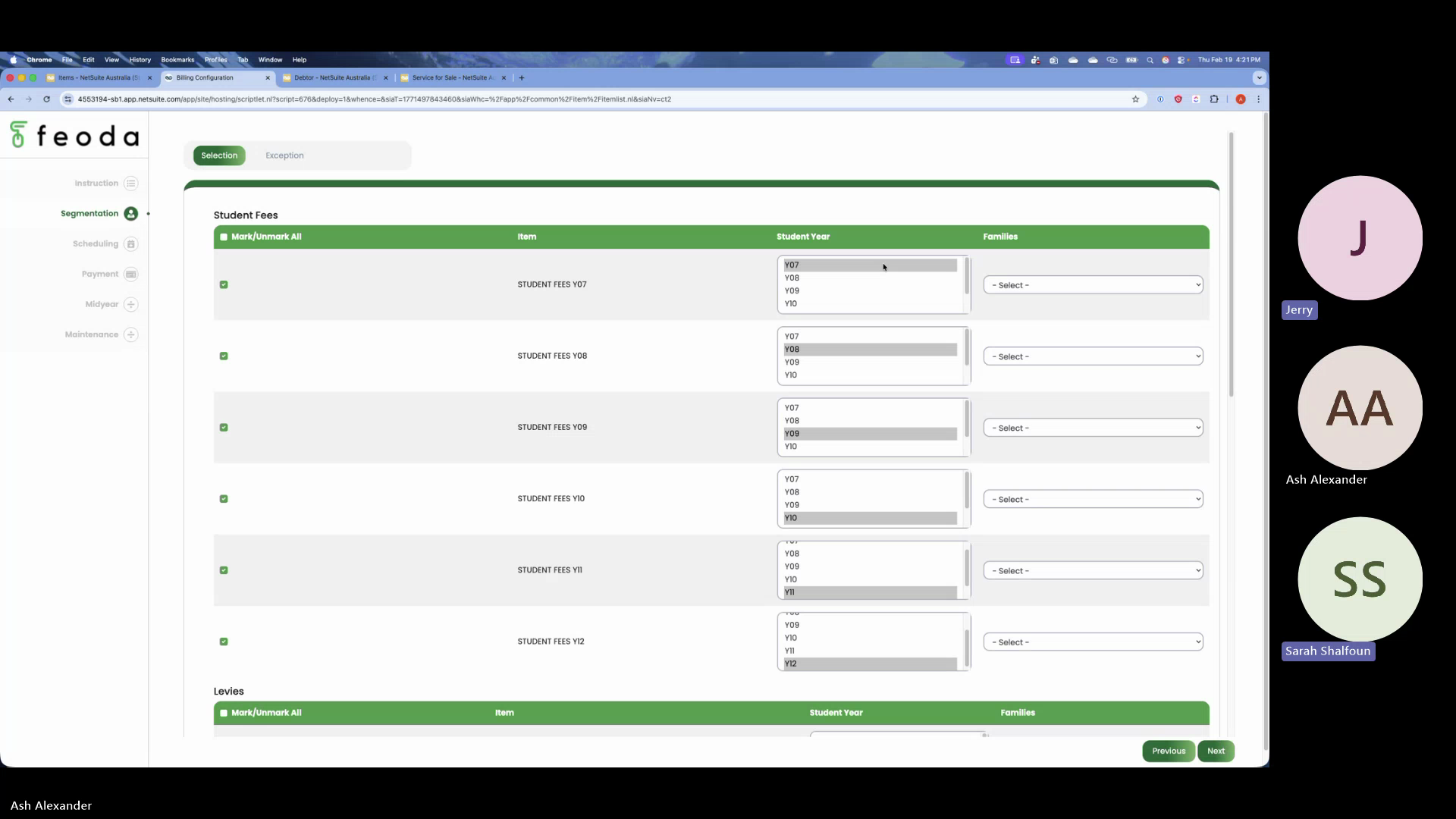
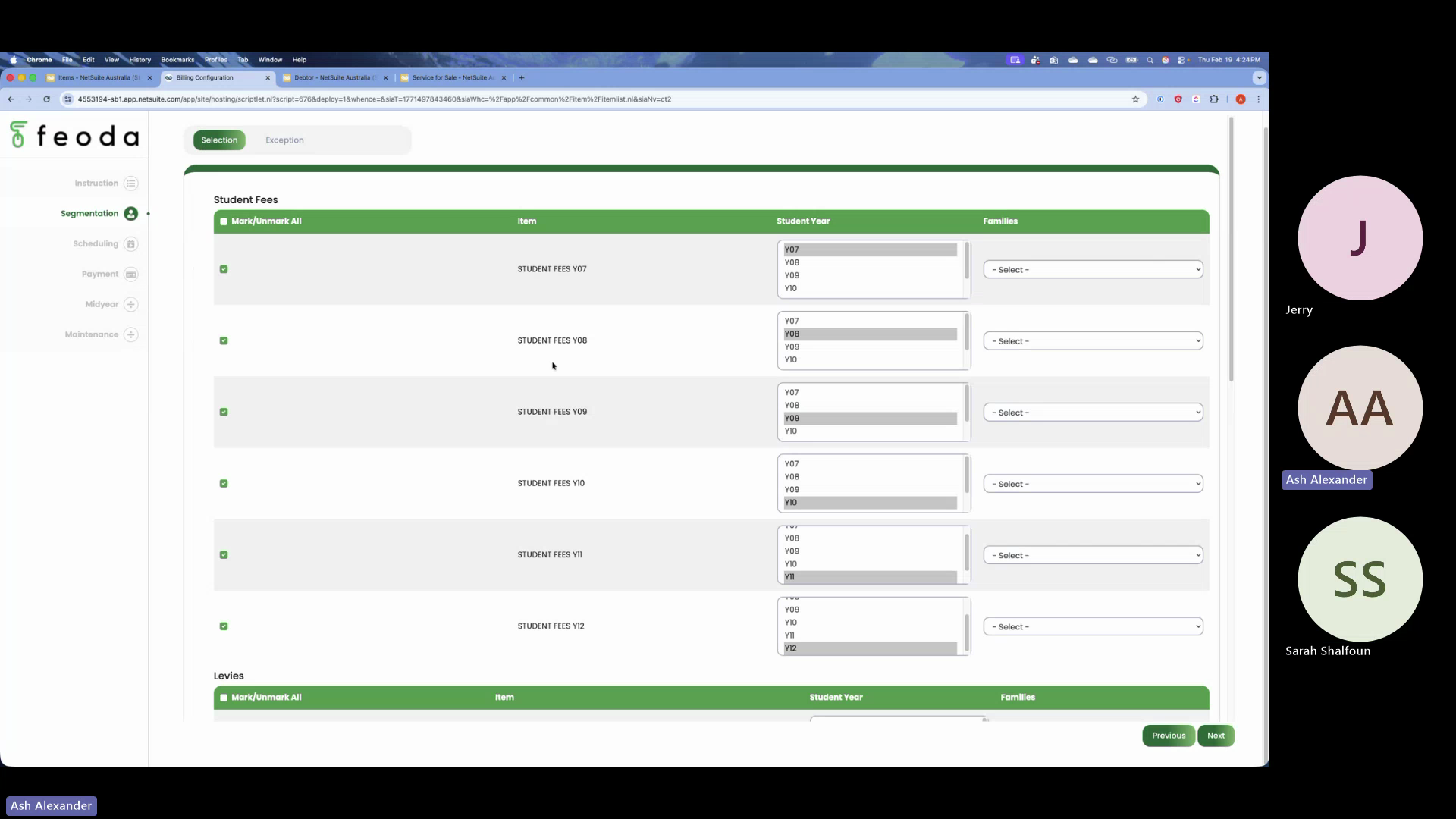
Tab 4: Items-to-Years Mapping
- Maps selected items to year levels and student types
- Example: laptop hire fee → year 8 and 11 only; building levy → all years (7-12); staff discount → "staff" student type only
- Jerry: "It's basically writing code visually — applying instruction to the system"
- Student types (all students, staff only, etc.) are school-specific and configurable
- The category groupings shown in the UI are cosmetic — no back-end classification exists yet
- Jerry: "We've just grouped it on the design, but there's no back-end classification as yet — that's something you need to build"
Tab 5: Exceptions
- For excluding specific students or families from particular items or rules
- Example: laptop fee applies to year 8 and 11, but exclude a specific student from year 8
- Can target individual students, groups of students, or specific family codes
- Jerry: "This is more for exception handling"
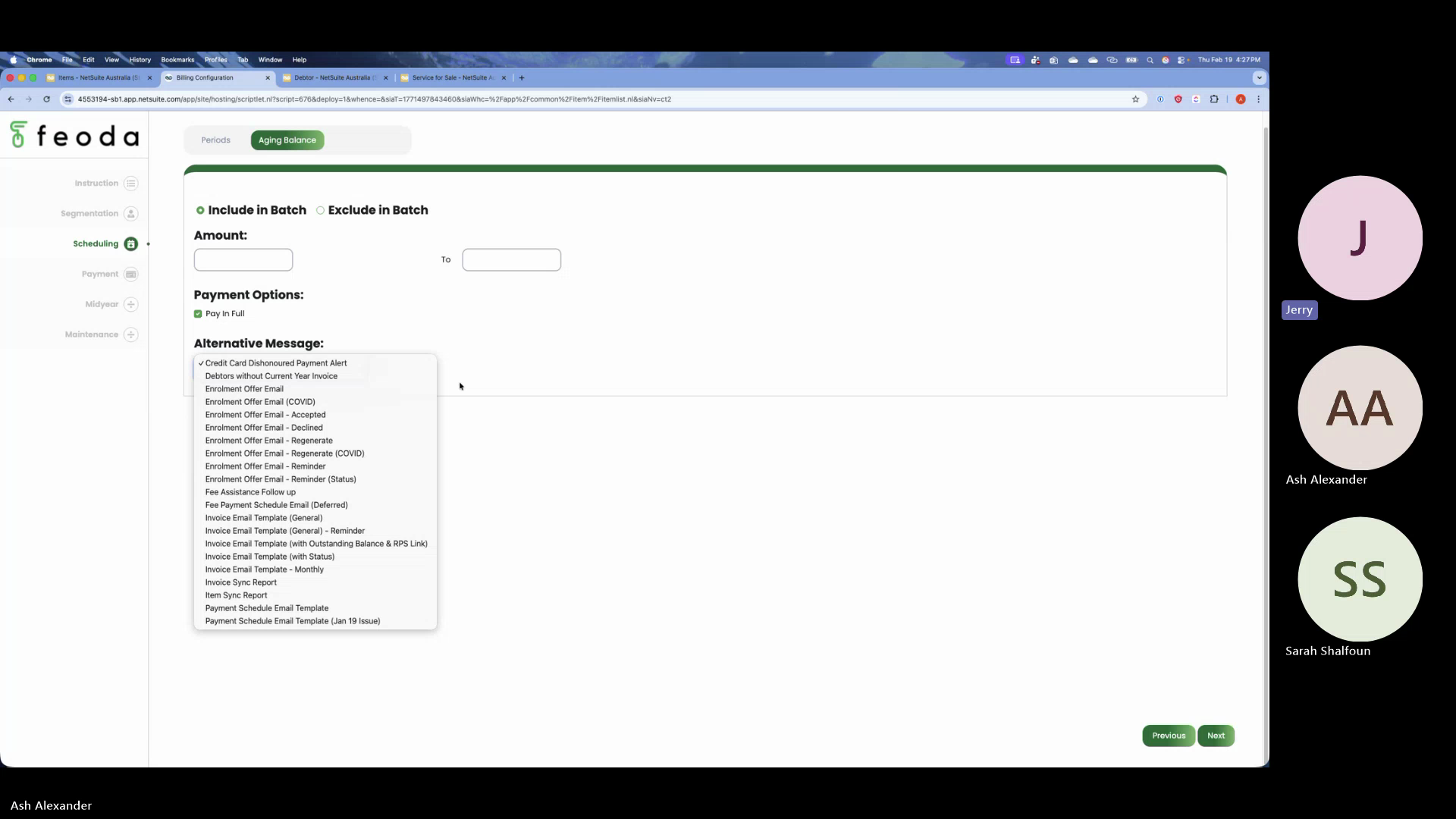
Tab 6: Scheduling/Period
- Sets the billing period (start date, end date)
- Configures preset messages for families with pending balances (e.g., "you must pay in full")
- Can exclude certain debtors from batch processing based on outstanding amounts
- Also includes options for opening balance handling (though Jerry clarified this tab is not related to the "update opening balances" script — that's a separate background process)
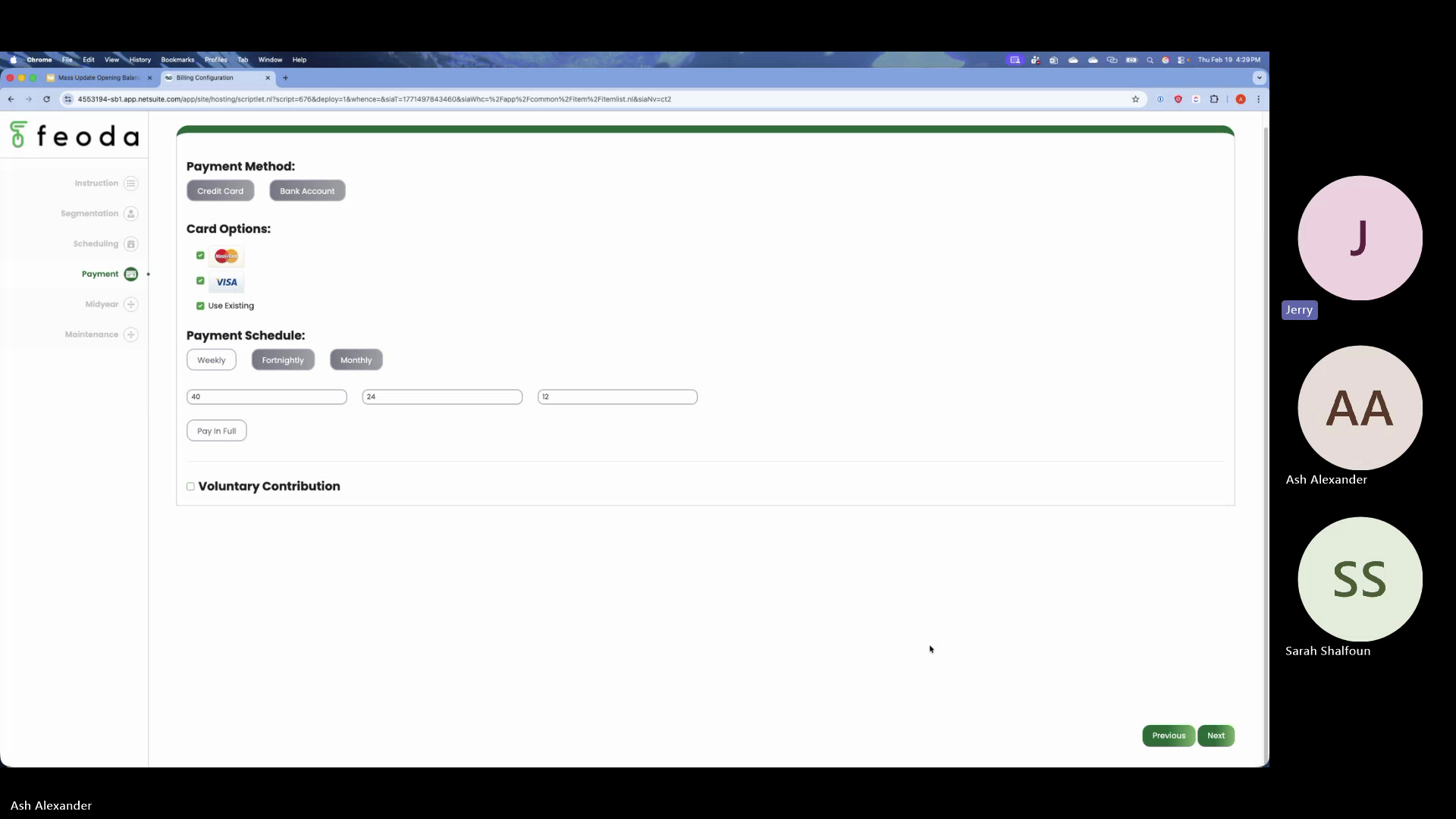
Tab 7: Payments
- Configures which payment options to show on the parent payment suitelet
- Options: credit card, bank/direct debit
- Payment frequency: weekly, fortnightly, monthly — and how many payment splits for each
- Sarah asked why monthly would have anything other than 12 payments — Jerry explained: the school had a requirement where weekly/fortnightly cycles could be shortened (e.g., "pay within 20 weeks instead of 24")
- The number of splits is configurable per frequency, not hardcoded
- Ash clarified: annual payment splitting (for banking limit reasons, e.g., splitting $100K across multiple dates) is controlled by the parent on the payment suitelet, not by this tab
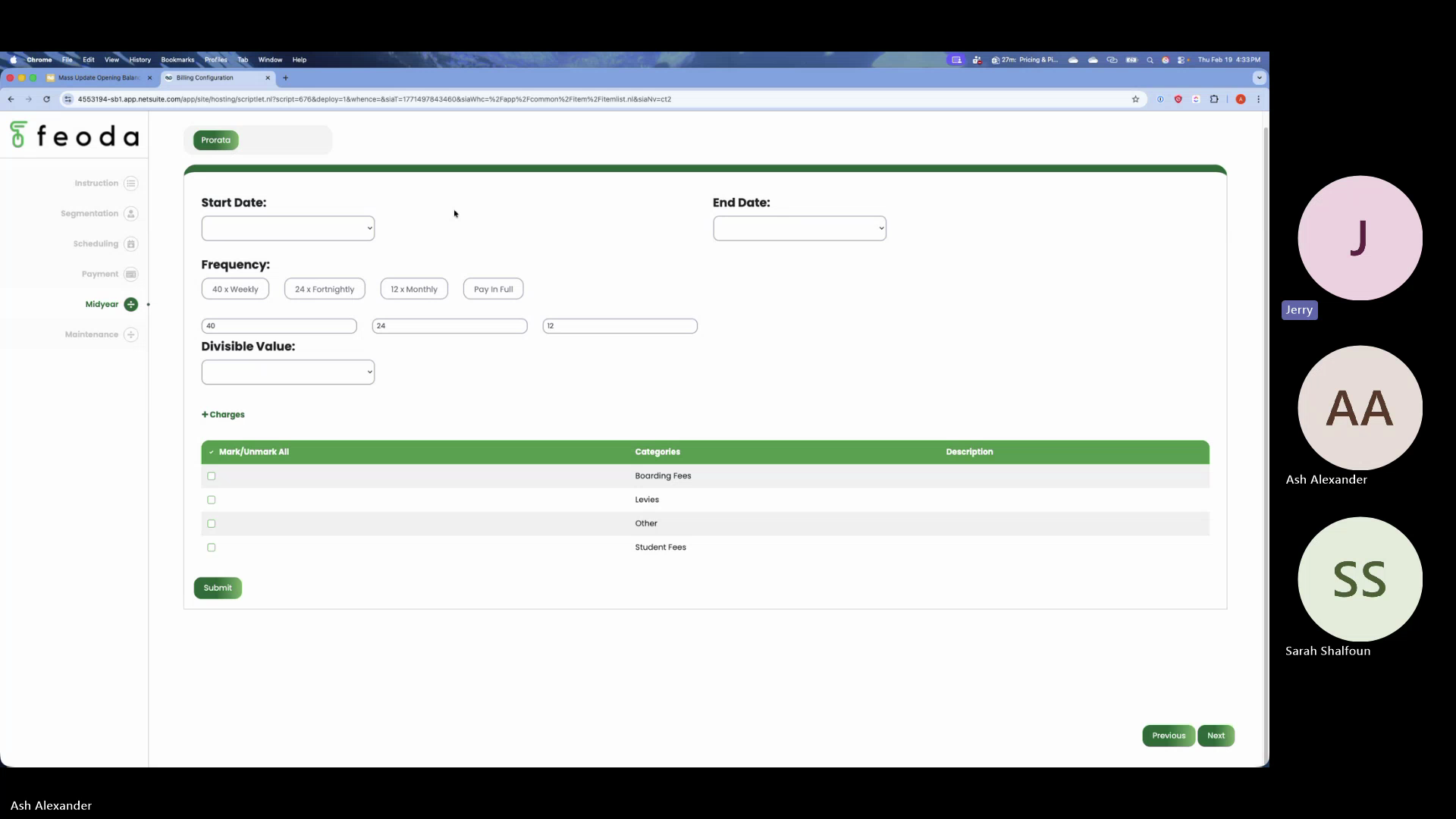
Tab 8: Mid-Year
- Handles students who start mid-year (outside the standard billing period)
- Sets a different billing period start/end for mid-year enrollees
- Uses a "divisible value" to calculate prorated billing amounts
- Jerry: "This is all particular to the school... the idea behind midyear was if any kid starts in the middle of the year, there needs to be a start date and end to the billing engine"
- Jerry clarified: this is a one-time setup instruction, not something run each time a mid-year student enrolls — it's a preset for how the engine treats mid-year students
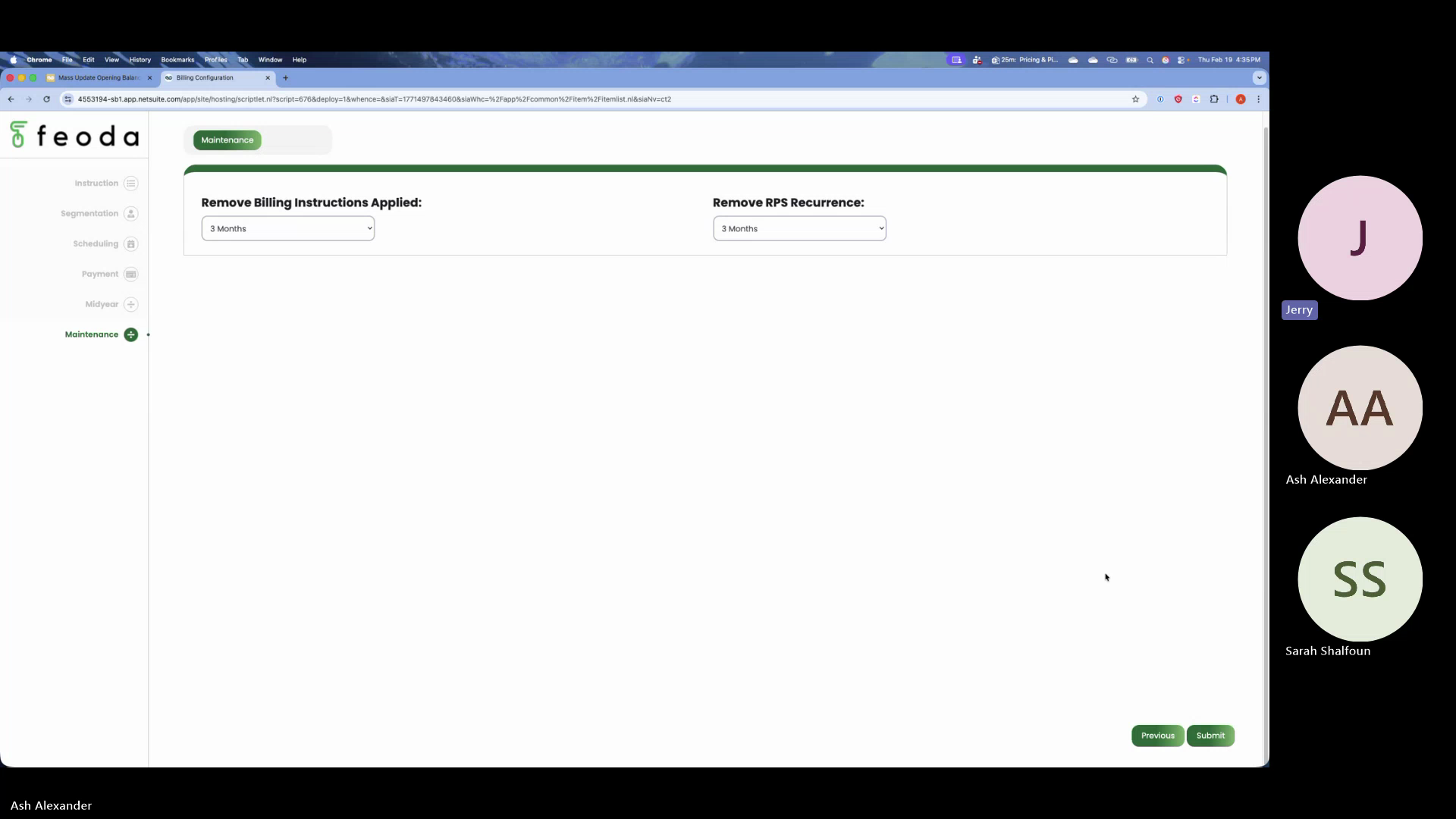
Tab 9: Maintenance
- Data cleansing utility — deletes unnecessary records created by prior billing cycles
- The configurator creates batches of custom records each cycle; this tab cleans up stale data
- Can be set to auto-clean every 3 or 6 months
- Jerry: "A lot of the way this solution was designed... we couldn't go back 2-3 steps to where we created certain records which were unnecessary, which could have been done by code itself"
Topic 3: Current State — What Works and What Doesn't (Jerry)
Summary: Jerry was explicit that the configurator is largely non-functional beyond the basic flow.
Key Statements from Jerry: - "This billing configurator does not work. Everything you see on the UI is all bells and whistles. It's all smokes and mirrors. It's just a business solution that we wanted, designed on the UI, and I'm probably 10% of this works." - The second tab (items-to-years mapping) "does not work — it does not do anything. Even if you keyed in any data and submitted, it does nothing." - The design was done "with NetSuite in mind, a particular school in mind, as well as our final outcome in mind — so it became like a big soup of all three and that's when the clarity got missed and everything was left half baked" - The Weddington Academy version was "quite comprehensive, but again had a few parts which did not work"
What actually works (Saint Edwards): - Ash confirmed: Saint Edwards uses the configurator, but only the bare minimum — they go to the Families tab, verify the debtor count, verify the student count, optionally change the billing period number (e.g., 22 instead of 24), and hit Submit - "They don't change anything. They don't change any inputs, nothing." - "They don't alter anything on the screen, they don't do anything on the screen... just hit submit and then the billing instructions are generated"
Topic 4: Billing Instruction Records in NetSuite (Jerry & Ash)
Summary: Jerry explained how the billing instruction and billing instruction applied-to records work as the back-end data store that the configurator was meant to create automatically.
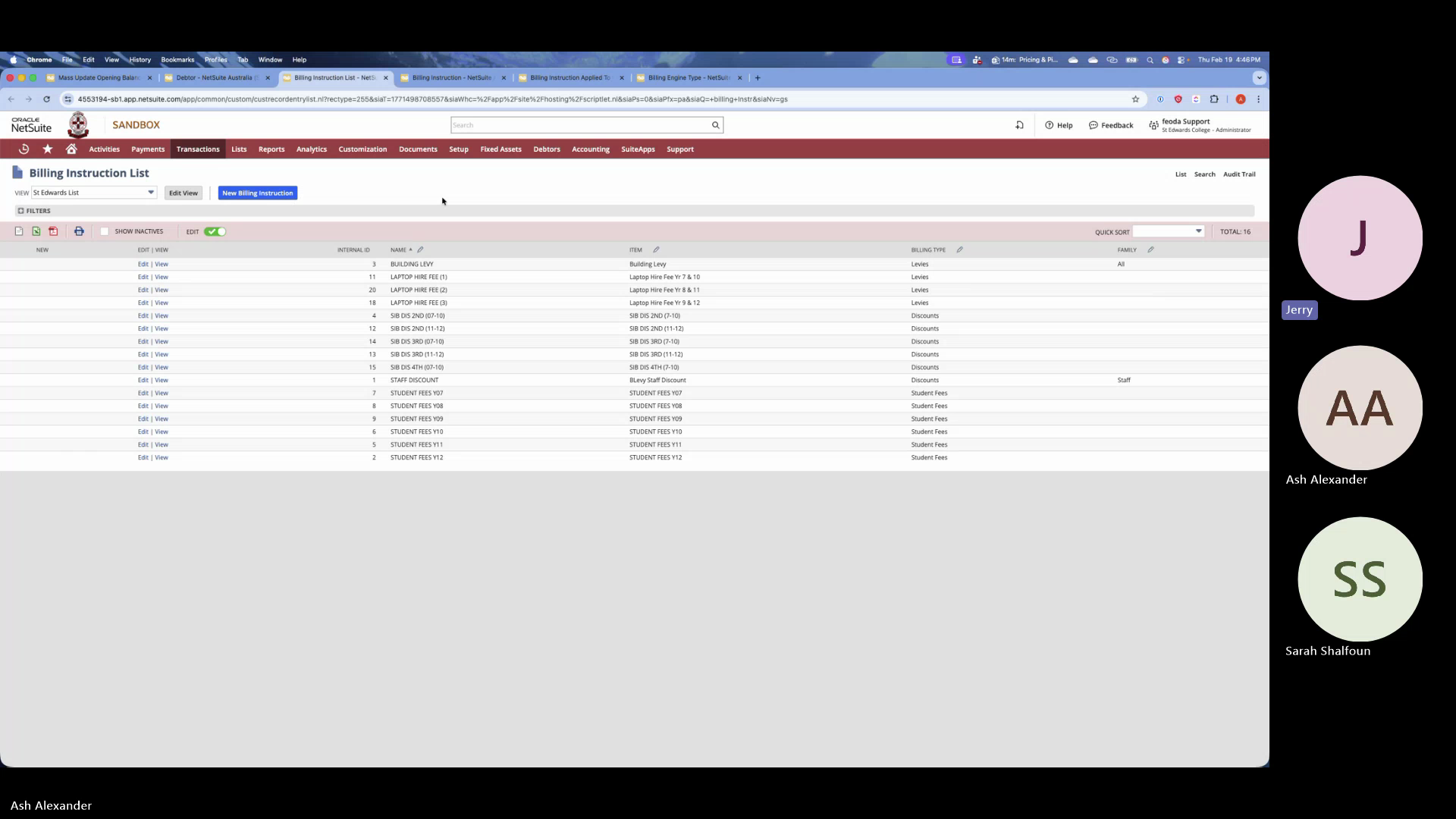
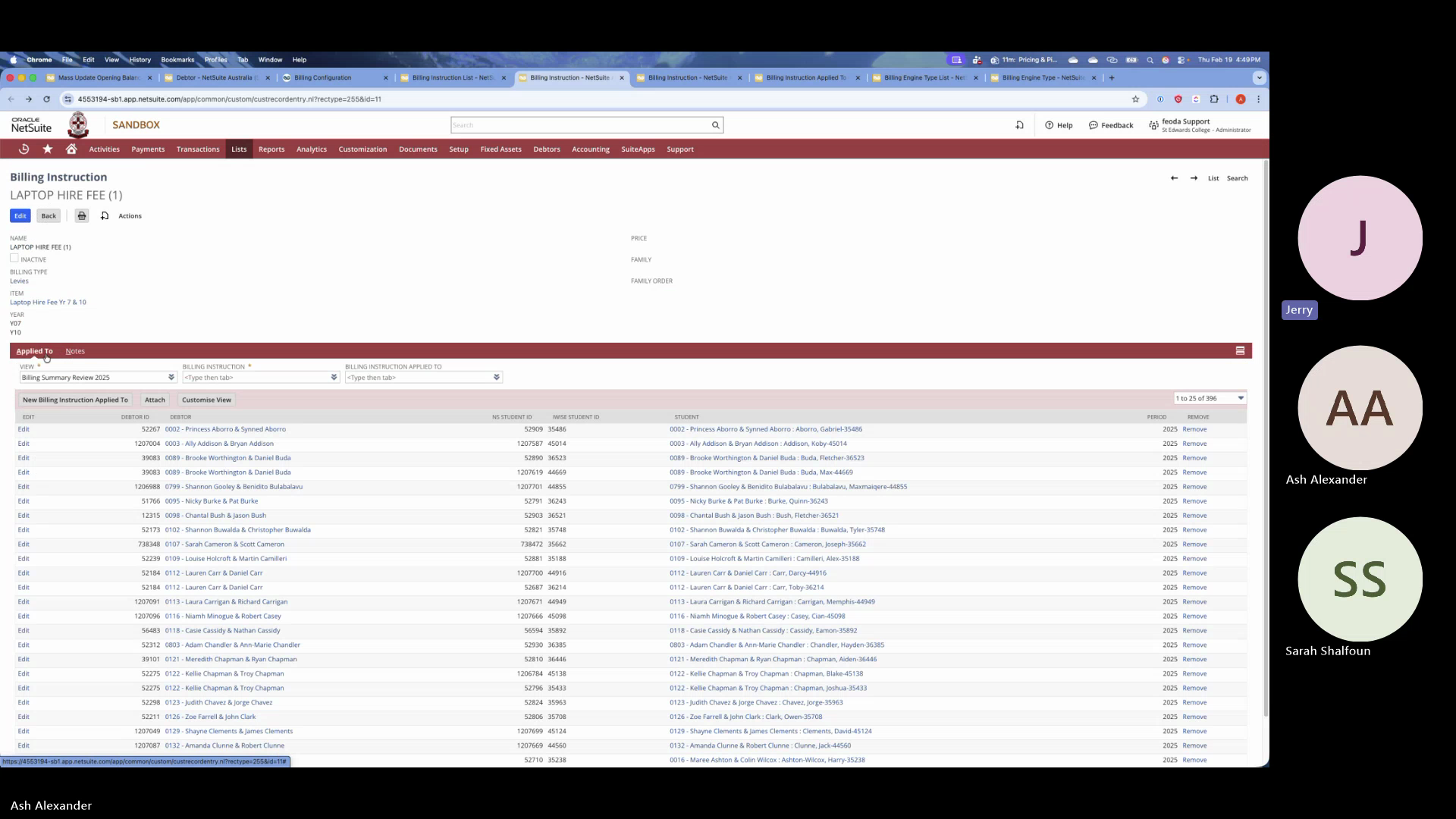
Key Points: - Billing Instruction is the master record — one per item per year level (e.g., "Student Year Fee 7") - Each billing instruction has a billing engine type field — this is the custom classification that ties back to the segmentation tab - Billing Instruction Applied To is the child record — lists every student/family that instruction applies to (e.g., 45 year-7 students who get laptop hire fee) - The configurator, when working, would automatically create these records based on the user's selections - Jerry: "The configurator is simply a visual representation of what NetSuite's back-end is... because this screen is not user-friendly for a school user, we've simplified that into the UI" - Currently, Ash creates these manually via Excel/CSV import for Pymble and Al Faisal - For the newest accounts (post-Al Faisal), they don't use billing instructions or billing engine type at all — just the simpler billing instruction applied-to records
Topic 5: Version Control Problem (Jerry)
Summary: Jerry identified the fundamental problem — there are now 3-4 different versions of the billing solution across clients, and version control has become unmanageable.
Key Statements from Jerry: - "Saint Edwards has a version. Al Faisal has a version. And the rest of the two schools have another version." - "4 schools down and we already have 3 versions" - "The whole code architecture, the deployment architecture, the whole management of generic versioning versus specific versioning went into a havoc and all the solutions got mixed. And now it's like a big soup." - The standard flow is: GitHub → Development Account → Demo Account → Client Accounts
Ash confirmed: The current deployment flow is GitHub → dev account → demo + every client.
Topic 6: Jerry's Architectural Recommendations
Summary: Jerry laid out a clear three-layer architecture recommendation for rebuilding the configurator.
Recommendation — Three-Layer Architecture:
| Layer | Description | Jerry's Words |
|---|---|---|
| Layer 1: Generic Base | Core billing engine features (~15 features) that apply to any school. Standard, never customized per client. | "There needs to be a generic version which can apply to any school — that should be the base. It's probably 10-15 features." |
| Layer 2: Configurable | Point-and-click configuration for school-specific preferences (items, year mappings, payment options, billing frequency). This is what the configurator UI should handle. | "Then there's another additional layer which can be handled by the configurator — which I can tweak and change and play how my engine should work." |
| Layer 3: Custom/Exception | An open framework for school-specific exceptions that can't be handled by configuration. Must integrate back into the central solution. Decide per exception whether to promote to the generic version. | "You need to keep another open framework to be able to integrate new exceptions for that particular school back into our primary solution." |
Jerry's other recommendations: - Start from the cleanest version: "The new two schools which have the simpler version — that would be a good starting point. Take pieces from Saint Edwards, not the entire thing." - Don't fix old clients first: Saint Edwards and Al Faisal should be "a backup fix" — don't spend time or money on those now - Build outside NetSuite and integrate: Jerry's "big recommendation" — consider building the configurator outside NetSuite and integrating back, "because this is the mistake we did last time — the design was done with NetSuite in mind, a particular school in mind, as well as our final outcome in mind" - Version control discipline: "The whole versioning and the flow of how the version control has to happen — that's the real game in this" - Keep the dev account permanent: "The development account needs to be like a permanent account. We can't lose that account — if you lose it, the entire solution crumbles" - Schools won't self-serve: "I'm not sure if any school would have somebody trained to do this, or we can train some administrator in a school to do this on their own because it's quite technical"
Sarah's response: Agreed with the approach — will aim to abstract school-specific requirements into generic capabilities when possible, rather than hard-coding per client.
Decisions Made
| Decision | Details |
|---|---|
| Configurator needs rebuild | Current implementation is ~10% functional; cannot be patched to full functionality |
| Start from the simplest version | Use the newest (post-Al Faisal) accounts as the starting codebase, not Saint Edwards or Al Faisal |
| Three-layer architecture | Generic base → Configurable → Custom exception |
| Fix existing clients later | Saint Edwards and Al Faisal are "backup fix" — deprioritized |
Action Items
| Action | Owner | Deadline | Status |
|---|---|---|---|
| Flush out requirements with Ravi and Ash — define generic vs configurable vs custom features | Sarah | TBD | Open |
| Design repository and version control architecture for the three-layer approach | Sarah | TBD | Open |
| Build centralized version on the dev account | Sarah / Ash | TBD | Open |
| Jerry available for brainstorming sessions as needed | Jerry | Ongoing | Open |
Key Screenshots
| Timestamp | Screenshot | Description |
|---|---|---|
| 1:00 |  |
Billing profile record in NetSuite — equivalent to BPOS subscription plan |
| 3:30 | 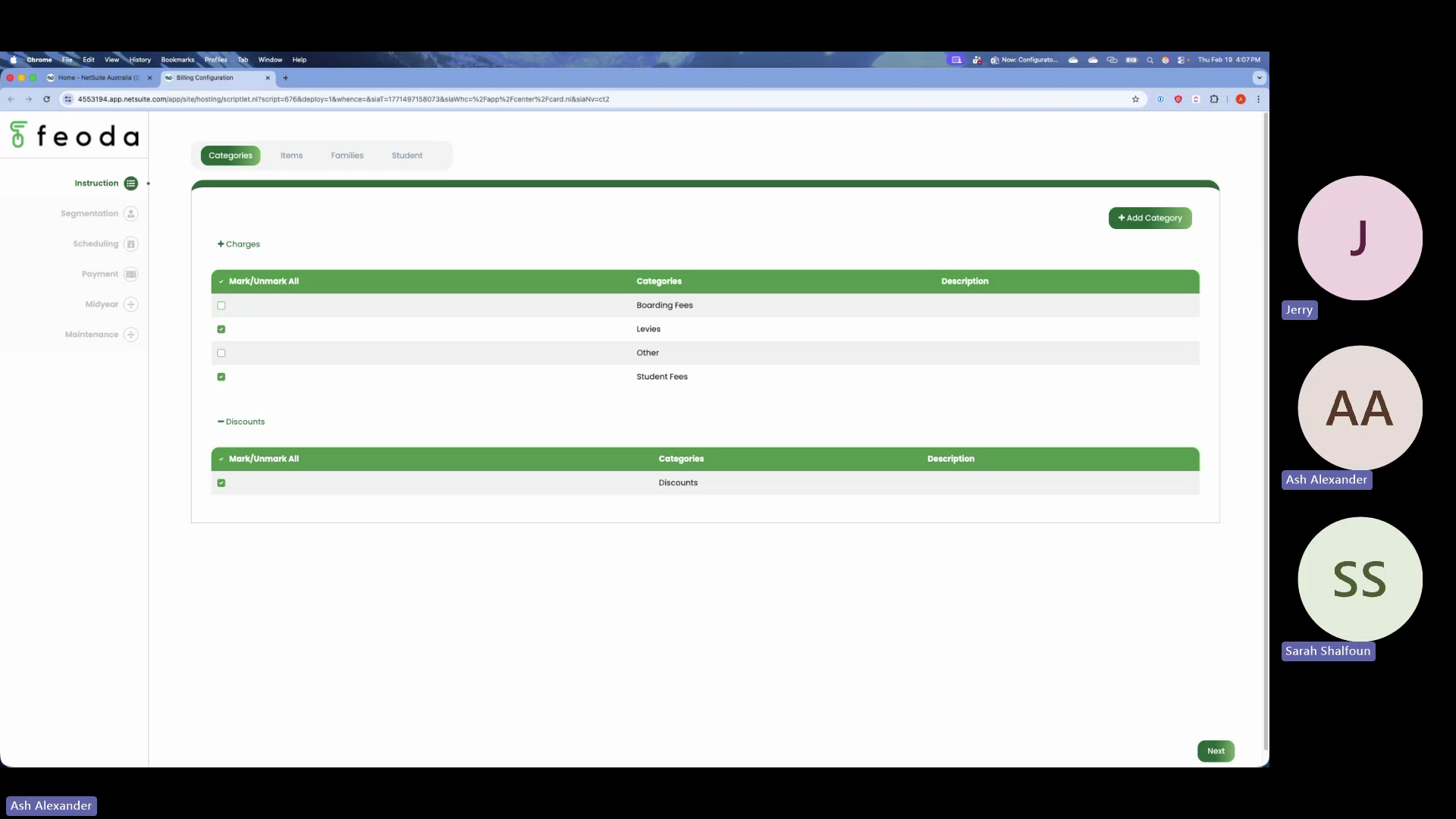 |
Configurator suitelet — loaded after launch |
| 6:40 | |
Segmentation tab — charges vs discounts |
| 10:40 | |
Items tab — selecting items for the billing cycle |
| 13:00 | |
Families/debtors tab — family selection and reconciliation |
| 17:00 | |
Items-to-years mapping — which items apply to which year levels |
| 20:00 | |
Exceptions tab — Ash demonstrating exception handling |
| 23:20 | |
Scheduling/period tab — billing period and preset messages |
| 25:20 | |
Payments tab — payment method and frequency configuration |
| 28:50 | |
Mid-year tab — handling mid-year student enrollments |
| 31:20 | |
Maintenance tab — data cleansing utility |
| 42:20 | |
Billing instruction record — individual record showing classifications |
| 45:00 | |
Billing instruction applied-to — child record listing students/families |
Technical Insights
- The configurator suitelet is a NetSuite Suitelet — a server-side SuiteScript page
- The segmentation tab sources data from a custom classification field on item records (billing engine type / class field)
- The class field was introduced by NetSuite as part of a release adding more custom fields under classification — used by Feoda for item categorization
- Billing instruction records store the "what" (item + year level + period), applied-to records store the "who" (students/families)
- The configurator creates custom records in the background when executed — this is why the maintenance tab exists for cleanup
- The development account is the source of truth; code flows: GitHub → dev account → demo + client accounts
Open Questions
- How will the three-layer architecture map to the GitHub repository structure? Single repo with feature flags, or separate branches/packages?
- What are the 10-15 "generic features" for Layer 1? Needs requirements workshop with Ravi and Ash
- Should the configurator be rebuilt inside NetSuite (Suitelet) or outside (external app integrating via SuiteTalk/REST)?
- What's the plan for fixing Saint Edwards and Al Faisal after the centralized version is built?
- Can schools realistically self-serve with a configurator, or will Feoda always run the billing cycle?
Source Files
| File | Location |
|---|---|
| Video | video.mp4 |
| Transcript (docx) | transcript.docx |
| Transcript (txt) | transcript.txt |
| Frames | extracted frames |